

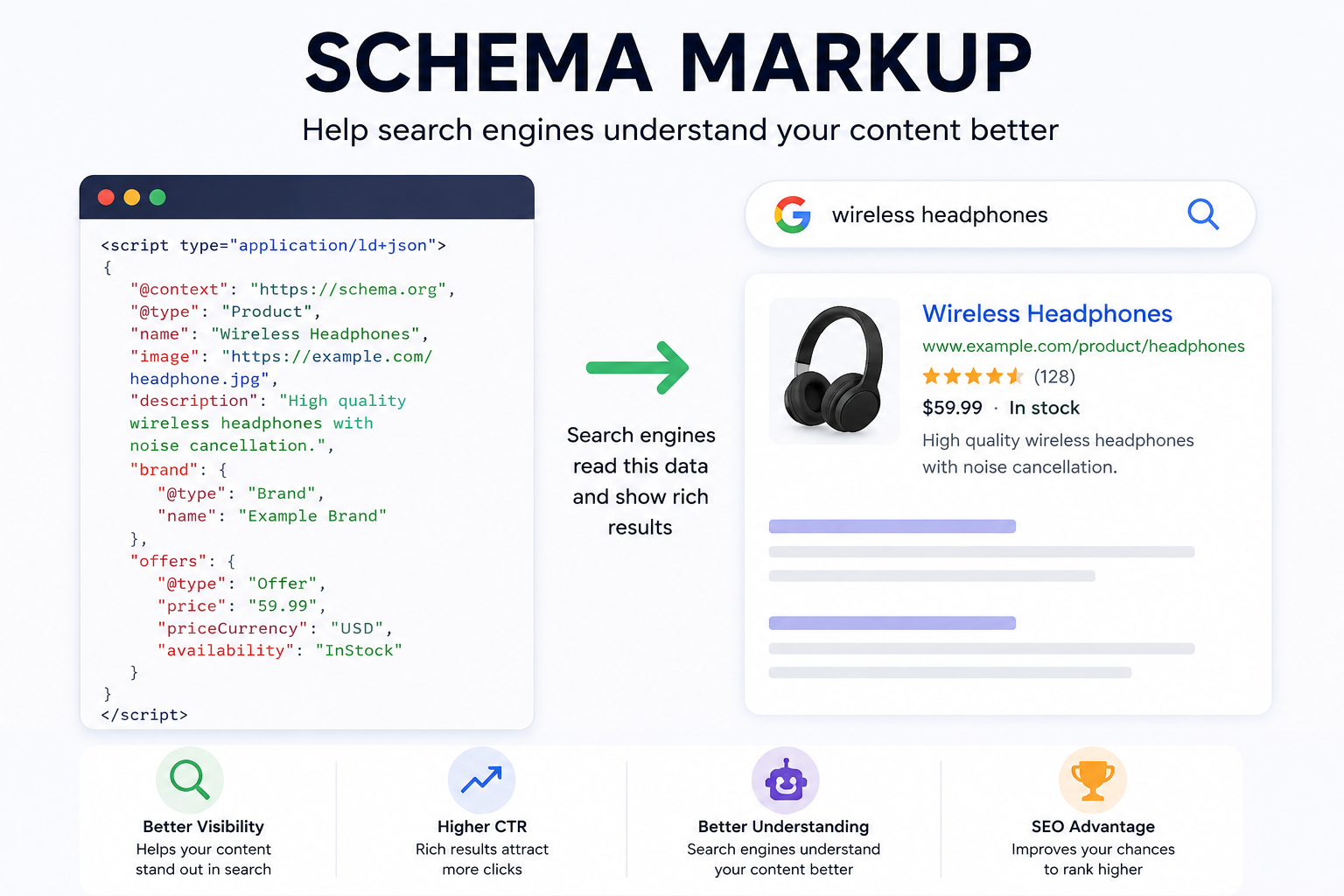
Schema markup is a block of JSON-LD sitting in your page source that tells Google, Bing and now the AI answer engines what each string on the page actually means. Without it, a crawler sees the text "₹2,499" and has to guess whether that's a price, a discount, a shipping threshold or a phone extension. With it, the page declares: this is a Product, its offer price is 2499 INR, it's in stock, it has 214 reviews averaging 4.6. That declaration is what makes star ratings, price and stock status appear under your listing in search results. That's the whole trick. It isn't magic, and it won't rank a bad page — but on a Shopify store, broken or missing schema quietly costs you clicks you've already paid to earn.
Most Shopify stores we audit have schema. Most of it is wrong in at least one place.
What your theme already outputs, and where it falls over
Dawn and most well-built commercial themes ship a structured-data snippet that emits Product and BreadcrumbList JSON-LD on product pages, plus an Organization or WebSite block on the homepage. So you're rarely starting from zero. The trouble starts when a second source of truth appears.
A review app injects its own Product node so it can attach aggregateRating. An SEO app injects a third, because that's what SEO apps do. Now the page has three Product objects with three different price values, and Google picks one — usually not the one you'd choose. We see this on maybe half the stores that come to us with a Search Console warning they can't explain.
The fix is boring and it works: one Product node per page, assembled in the theme, with the review app's rating passed into it rather than emitted separately. Every app that offers a "disable structured data output" toggle should have that toggle off unless it's the only source.
The schema types that are actually worth building
There are hundreds of types on schema.org. Four of them earn anything on a commerce site.
- Product with a nested Offer. Price, priceCurrency, availability, and a valid image. This is the one that produces the price and stock line under your result and feeds the free product listings in Google Shopping surfaces.
- BreadcrumbList. Replaces the ugly URL string in the SERP with Home › Sarees › Kanjivaram. Cheap to add, hard to get wrong, and it makes deep collection pages look less like orphan URLs.
- Organization on the homepage, with logo, sameAs links to your social profiles, and a real postal address. This is entity groundwork. It matters more now than it did three years ago, because LLM-based answer engines lean on structured entity data when deciding whether two mentions of a brand name refer to the same company.
- AggregateRating and Review, but only where the reviews are genuine, visible on the page, and collected from real buyers. More on that below, because this is where stores get penalised.
Article schema for blog posts is fine to include and does close to nothing. LocalBusiness matters if you have a physical store; it does not if you don't, and adding it anyway to a pure D2C site is the kind of thing that gets flagged.
FAQ schema is mostly dead and nobody tells you
For a few years, FAQPage markup was the cheapest rich result in existence. Bolt an accordion onto a product page, mark it up, and your listing doubled in height. Google restricted FAQ rich results in 2023 to a narrow set of government and health sites. HowTo went the same way.
Plenty of Shopify SEO apps still advertise FAQ schema as a feature, and plenty of agencies still bill for it. It's not harmful. It's just not going to show up. If someone quotes you for "full schema implementation" and the deliverable list leans on FAQ and HowTo, ask what they expect it to produce.
What a star rating is actually worth: the arithmetic
Founders ask what the return is, and the honest answer is that it's modest and it compounds. Run the numbers on a mid-size catalogue.
Say your product pages pull 60,000 organic impressions a month at a 2.2% click-through rate. That's 1,320 clicks. Suppose adding valid review markup and correct price/availability lifts CTR to 2.8% — an assumption, not a measured figure, but a defensible one for a listing that gains stars and a price line. You now get 1,680 clicks. That's 360 extra visits.
At a 1.4% product-page conversion rate, 360 × 0.014 = 5.04 orders. Round to five. At a ₹2,400 average order value, that's ₹12,000 a month, or ₹1.44 lakh a year, from work that takes a competent developer one to two days once.
Five orders a month is not a growth strategy. It's also free traffic you're currently handing to whoever below you has the stars. And the same markup is what keeps your Merchant Center feed and your organic listings agreeing with each other, which is worth more than the CTR bump on any store running Shopping ads.
Shipping and returns in the markup, which most Indian stores skip
Google reads shippingDetails and hasMerchantReturnPolicy inside the Offer object and can surface delivery cost and return window directly in the result. On a category where every competitor shows a bare price, "Free delivery, 7-day returns" in the listing does more for click-through than a fourth star.
Almost no Shopify theme emits these by default. You have to add them, and you have to keep them honest — if your policy page says 7 days and the markup says 30, that's a mismatch waiting to be flagged. For an Indian store the fiddly part is shipping rates that vary by pincode zone. You can express regional shipping rates in the markup, but if your rates are genuinely complex, declaring a single national free-shipping threshold above your actual threshold is worse than declaring nothing.
The mistakes we fix most often
Price shows the cheapest variant. A kurta set from ₹1,299 to ₹3,499 marks up as 1299. The user clicks expecting ₹1,299, lands on a page defaulting to the ₹2,499 variant, and bounces. Use lowPrice and highPrice in an AggregateOffer, or make the default variant and the marked-up price the same thing.
Availability never updates. Hardcoded InStock in a snippet someone pasted in 2022. Sold-out products keep advertising availability, users arrive at a greyed-out Add to Cart, and Google eventually stops trusting the feed. Bind it to the variant's inventory state in Liquid.
Currency wrong on international markets. Shopify Markets serves a US visitor a USD price on the storefront while the JSON-LD still says INR, because the snippet reads product.price rather than the market-adjusted value. If you sell into the UAE or the US from an Indian store, check the schema on each market's domain, not just the primary one. This one breaks silently.
Ratings with nothing behind them. AggregateRating for products that have zero reviews, or ratings pulled from a site-wide average and stamped on every SKU. Google treats invented review markup as spam and issues manual actions for it. We've inherited stores under one. Getting it lifted takes weeks and a reconsideration request, and in the meantime every rich result on the domain disappears.
GST-inclusive versus exclusive. If your storefront displays ₹2,499 inclusive of GST, the schema must say 2499. Some B2B-leaning themes mark up the pre-tax value. The displayed price and the marked-up price have to match exactly, or the item gets disapproved in Merchant Center and you lose the free listing along with the paid one.
Checking yours in about ten minutes
You don't need a tool subscription for this.
- Open Google's Rich Results Test and run one product URL, one collection URL and your homepage. Three page types cover most of a Shopify store's structure.
- On the product page, confirm exactly one Product item is detected. Two means duplicate sources.
- Check the detected price against what the page shows. Check availability against actual stock. Check the currency.
- Run the same URL through the Schema.org validator, which reports vocabulary errors Google's tool ignores. Useful because Bing and the AI crawlers are less forgiving of malformed nesting.
- In Search Console, open Enhancements and look at the Merchant listings and Product snippets reports. Warnings there are ranked by how many URLs they affect, which tells you what to fix first.
If a product page passes all five, your schema is fine and you should go work on something else. Page weight, probably.
Implementing it on Shopify without breaking the theme
Schema lives in a Liquid snippet, usually snippets/structured-data.liquid or similar, rendered from the product template. Editing it directly is fine on a duplicated theme; do not edit live during a sale week, because a stray comma in JSON-LD invalidates the whole block and takes every rich result on the site with it.
Fields like GTIN, MPN and brand often aren't in Shopify's default product object in a usable form. Set them as product metafields, populate them from your PIM or a CSV, and reference the metafield in the snippet. Once that plumbing exists it also feeds your Merchant Center feed, so the work pays twice.
Budget half a day for a clean single-language store, one to two days if you're running multiple markets and currencies, longer if the current markup is spread across three apps and someone has to work out which one to switch off. If you don't have a developer who's comfortable in Liquid, this is a small, well-defined job to hand out — the sort of thing we'd scope inside a broader SEO and content engagement, or that a founder can brief to a Shopify developer on a short retainer without a full project.
Does any of this matter for AI search?
Partly, and less than the LinkedIn posts claim. ChatGPT, Perplexity and Google's AI Overviews mostly read rendered page text; they're not primarily schema consumers. What structured data does is disambiguate. When a model has to decide whether "Aster" the skincare brand and "Aster" the hospital chain are the same entity, an Organization block with a consistent name, address and sameAs set of profile links is the cheapest signal you can give it. Same for products: a Product node with a GTIN is machine-resolvable in a way that a <h1> is not.
So build it because it's correct, not because it'll get you cited in an AI answer. If the citation comes, good.
Pick your three highest-traffic product URLs from Search Console and run them through the Rich Results Test now. If any of them show two Product items, a stale price or a rating you can't trace to real reviews, that's the first thing to fix this week. If you'd rather someone else look, our free store audit covers structured data alongside speed and technical SEO, and you'll get the specific lines that need changing rather than a score out of 100.